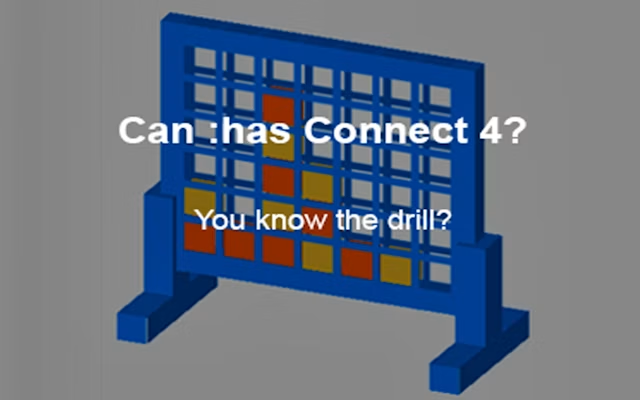
Can Has Connect 4
2 player game · Board & Card
 Snake and Ladders Multiplayer
 Guess Who Multiplayer
 Lof Snakes and Ladders
 Ludo Wars
 Online Tic Tac Toe
 Easter Tic Tac Toe
 Tic Tac Toe Original Pro
 Tic Tac Toe Pro - Multiplayer & Challenge
 Master Checkers
 Domino Multiplayer
 Tic Tac Toe Multiplayer
 Backgammon Multiplayer
 Reversi Multiplayer
 Goose Game Multiplayer
 Rummy Multiplayer
 Master Checkers Multiplayer
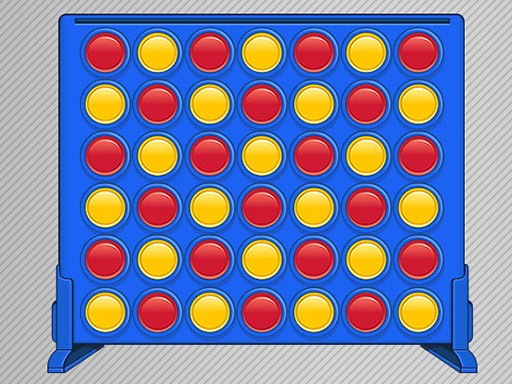 Connect 4 Multiplayer
 Master Chess Multiplayer
 Battleship War Multiplayer
 4 in Row Mania
 Checkers Legend
 Ludo Legend
 Backgammonia - online backgammon game
 Tic Tac Toe Blackboard
 Ludo Multiplayer
 Tic Tac Toe Stone Age
 Tic Tac Toe Vegas
 Tick Cross 2 Players
Connect 4 is one of the best games you can play with two people and one screen. It takes ten seconds to explain, a few minutes to play, and there is almost always a rematch.
This version, Can Has Connect 4, is built for exactly that: two players, one device, taking turns. There is no computer opponent and no account to create. Press Start Game and red goes first. Click a column to drop your disc, then hand the mouse (or the seat) to your friend. The first player to line up four of their own colour wins, and Play again starts the next round straight away.
We like it for a quick game with a sibling, a partner or a friend sitting next to you: the 3D board is easy to read, and there are no menus to get through between rounds.
Want to play against the computer or online? Try Connect 4 Multiplayer, which has a vs-computer mode and an online mode as well as a same-screen two player mode.
Connect 4 and Connect Four are trademarks of Hasbro. This is an independent browser game and is not affiliated with or endorsed by Hasbro.
How to play
Connect 4 rules
- The board has 7 columns and 6 rows. One player is red, the other is yellow.
- Red moves first. On your turn, choose a column and drop one disc into it. The disc falls to the lowest empty space in that column.
- Players take turns. You can't skip a turn, and you can't drop a disc into a column that is already full.
- The first player to get four discs in a row wins. The line can be horizontal, vertical or diagonal.
- If all 42 spaces fill up and nobody has four in a row, the game is a draw.
How to play two player on one screen
- Sit side by side and share the mouse, or pass the laptop back and forth.
- The disc floating above the board shows whose turn it is.
- Swap seats after each game so the same person doesn't always get the first move.
- Keep score on paper. First to five wins is a good match length.
Tips to win more games
- Take the middle. The centre column is part of more possible lines of four than any other column, so discs there are worth more.
- Check your opponent's threats first. Before you drop a disc, look for any place where they already have three in a line with a free space.
- Look before you fill. A disc you drop can give your opponent the space right above it. Don't play under a square they need.
- Build two threats at once. If you can set up two different winning spaces, your opponent can only block one.
More classic games for two: 2 player checkers and tic tac toe 2 player.
Frequently asked questions
- Can I play Connect 4 two player on the same computer?
- Yes. Can Has Connect 4 is made for two players on one device. Players take turns clicking a column, and the game switches between red and yellow automatically.
- Can I play Connect 4 against the computer?
- Not in this version, which has no AI opponent. If you want to play alone, try Connect 4 Multiplayer on our site, which has a vs-computer mode.
- Can I play Connect 4 two player online with a friend somewhere else?
- This version is for two players on the same screen. Connect 4 Multiplayer on our site also has an online mode.
- Is it free? Do I need to download anything?
- It's free and runs in your web browser. There is nothing to install and no sign-up.
- Who goes first in Connect 4, and does it matter?
- Red goes first in this game. Going first is an advantage: Connect Four was mathematically solved in 1988, and with perfect play the first player can always win by starting in the middle column. In normal games between friends, mistakes matter far more, so swap who goes first each round to keep it fair.
- Can a game of Connect 4 end in a draw?
- Yes. If all 42 spaces are filled and nobody has four in a row, the game is a draw.
More Board & Card games
See all → Monkey And Banana
 Tic Tac Toe Mania
 Carrom 2 Player
 Snake and Ladders Party
 Ludo King
 Tic Tac Toe: Paper Note
 Mahjong Battles Egypt
 Fantasy Ludo
 Pong ball.io
 Challenge the Runners
 Basket Random
 Car Battle
 Would you Rather?
 Drunken Duel
 Mega Tank Wars Arena
 Basketball Legends
 Eat Blobs Simulator
 Neon Slimes
 2 Player Games 1v1 Battle
 Escape School Duel
 Math Duel - 2 Players
 Stickman Fighting 2 Player
 Viking Tomahawk
 granny chapter2
 Electro.io
 2 Player Mini Challenge
 Flow Free: Warps
 Basketball AllStars
 DONT SPLASH
 Collect Brainrot Arena
 Hockey Stars
 Obby Highest Jump Ever
 Crumple Rumble
 Sniper for Brainrot
 Pongo Master
 Bob Save Stuart
 Little Yellowman Jumping
 Lucky Box - 2 Player
 Pumpking vs Mummy
 2 Player Santa Battle
 Red VS Blue
 Summer Shell
 Othello-Reversi
 Simple Plus Classic Pong
 Rainbow Bead
 Super Soccer
 Ugolki - Halma
 Try To Count The Boxes Brain Training
 Carrom Clash - Neon Edition