Red VS Blue
2 player game · Arcade
 Snake and Ladders Multiplayer
 Pong ball.io
 Lof Snakes and Ladders
 Electro.io
 2 Player Mini Challenge
 Collect Brainrot Arena
 Obby Highest Jump Ever
 Crumple Rumble
 Pongo Master
 Bob Save Stuart
 Little Yellowman Jumping
 Lucky Box - 2 Player
 Pumpking vs Mummy
 Summer Shell
 Othello-Reversi
 Simple Plus Classic Pong
 Rainbow Bead
 Ugolki - Halma
 Carrom Clash - Neon Edition
 Animal Paws Pong
 AnimalCraft Friends 2 Player
 Footy Frenzy
 Ghost Happy Halloween TwoPlayer
 Happy Brothers 2 Player
 Squirrels and Acorn - Draw your level!
 Ping Pong Pulse
 Gladiator Box
 RedPool Legends - 2 Player
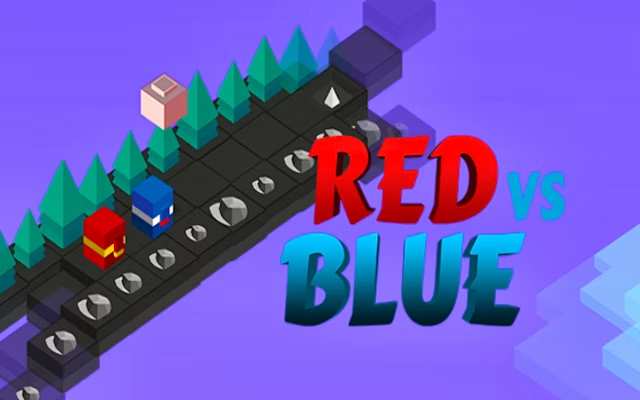
Red VS Blue is an endless runner for two players on a single keyboard. The world is drawn in an isometric view, and you race forward as one of two colored characters, one red and one blue. The goal is simple: get further ahead than your opponent and avoid the obstacles in the way.
The controls are meant to be shared easily. According to the platform page, the red player is controlled with the W key and the blue player with the Up Arrow. Because there are only two keys in play, you can sit side by side at the same computer and start right away. There is no menu full of options to learn.
Timing is what decides most rounds. You have to press at the right moment to get past each obstacle, and one late press can cost you the lead. The page also stresses that keeping your timing in sync matters, so it is worth watching what your opponent is doing as well as your own character.
The game runs in desktop and mobile browsers, in landscape, and uses HTML5. It was released in May 2025. Rounds go quickly, which makes it handy for a few quick rematches between friends. For another fast game on one keyboard, try Summer Rider 3D.
How to play
How to play
- Press play and sit next to your friend at one keyboard.
- The red player presses W. The blue player presses the Up Arrow.
- Time your presses to get past each obstacle.
- Stay ahead of your opponent for as long as you can. The one who falls behind loses.
Tips
- Do not mash the key. Press at the moment you need to, not all the time.
- Watch the other runner so you know how big your lead is.
- Agree on who is red before you start so nobody reaches for the wrong key.
Frequently asked questions
- What keys do the two players use?
- The platform page says red uses the W key and blue uses the Up Arrow.
- Can two people play on the same keyboard?
- Yes. That is how the game is designed to be played.
- Is it a race with a finish line?
- It is described as an endless runner, so the aim is to stay ahead of your opponent rather than reach a set finish.
- Does it work on mobile?
- The game runs in desktop and mobile browsers, but a shared keyboard is the easiest way to play with two.
More Arcade games
See all → Dots and Boxes Deluxe
 Riddle Cubes
 Dots & Boxes
 Orcborn: The Great Flight
 NO---3 Speed
 Red and Green 4
 Pixel Time Summer
 Ice Bricks
 Challenge the Runners
 Basket Random
 Car Battle
 Guess Who Multiplayer
 Would you Rather?
 Drunken Duel
 Mega Tank Wars Arena
 Basketball Legends
 Eat Blobs Simulator
 Neon Slimes
 2 Player Games 1v1 Battle
 Escape School Duel
 Ludo Wars
 Math Duel - 2 Players
 Stickman Fighting 2 Player
 Viking Tomahawk
 granny chapter2
 Online Tic Tac Toe
 Flow Free: Warps
 Basketball AllStars
 DONT SPLASH
 Hockey Stars
 Sniper for Brainrot
 2 Player Santa Battle
 Can Has Connect 4
 Easter Tic Tac Toe
 Super Soccer
 Try To Count The Boxes Brain Training