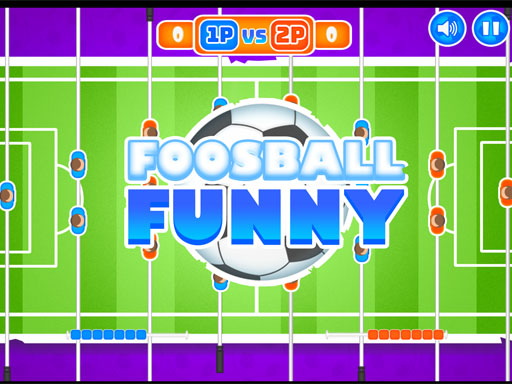
Foosball Funny
2 player game · Soccer
 Super Soccer
 Block Head Soccer
 Pill Soccer
 Head Soccer Football Game
 Fish Soccer
 Ragdoll Soccer
 Minicars Soccer
 Head Sport Football
 2 Player Among Soccer
 Fifa World Cup 2021 : Free Kick
 Football League Sports Games
 2 Player Head Soccer Game
 Finger Football
 Soccer Random
 Football Cup Superstars
 Santa kick Tac Toe
 football 2p 96
 BLITZ FOOTBALL 2022
 World Champions Football Sim
 Ultimate PK
 Head Soccer 2022
 Nations League Soccer
 Stick Soccer 3D
 Football Qatar 2022
 Head Soccer - Jeu de football à 2 joueurs
 Football Strike: Online Soccer
 Monster Soccer 3D
 Soccer Pixel
Table-football action is the premise of Foosball Funny. The description says children and adults can play on PC or mobile devices, while the instructions give separate control groups for two players. It leaves the match details brief, so the game screen is the place to inspect the actual table and starting options.
No winning score, timer or tournament structure is supplied. The description also does not explain rod selection, ball physics or computer opposition. Those missing features should not be filled in from another foosball game; start with the confirmed two-sided controls and learn how this table responds to them.
Try a few controlled movements before chasing the ball at full speed. Watching how the input affects the table gives you a useful basis for positioning, and agreeing on the displayed win condition first keeps a shared match clear when the score begins to rise. For another two-sided football challenge beyond the table, open Super Soccer.
Foosball Funny assigns W and S to Player 1, and Up and Down Arrow to Player 2. Although mobile devices are mentioned in the description, no touch gesture is given, so check the on-screen mobile controls rather than assuming a particular swipe layout.
How to play
How to play
- Use two compact keyboard groups in a foosball game for PC or mobile.
- Foosball Funny assigns W and S to Player 1, and Up and Down Arrow to Player 2.
- Although mobile devices are mentioned in the description, no touch gesture is given, so check the on-screen mobile controls rather than assuming a particular swipe layout.
Tips
- Try a few controlled movements before chasing the ball at full speed.
- Watching how the input affects the table gives you a useful basis for positioning, and agreeing on the displayed win condition first keeps a shared match clear when the score begins to rise.
Frequently asked questions
- What is the aim of Foosball Funny?
- Use two compact keyboard groups in a foosball game for PC or mobile.
- How do you control Foosball Funny?
- Foosball Funny assigns W and S to Player 1, and Up and Down Arrow to Player 2. Although mobile devices are mentioned in the description, no touch gesture is given, so check the on-screen mobile controls rather than assuming a particular swipe layout.
- Are mobile controls supplied for Foosball Funny?
- The description says mobile play is supported, but only keyboard bindings are supplied. Check the on-screen touch controls for the mobile layout.
More Soccer games
See all → Head Soccerr 2022
 Head Soccer 2023 2D
 Rumble Stars Football
 Rumble Stars Football - Online Soccer Game
 Endless Car Football Game
 Legendary Soccer
 Messi vs Ronaldo KTT
 Pixel Ball League
 Snake and Ladders Multiplayer
 Pong ball.io
 Challenge the Runners
 Basket Random
 Car Battle
 Guess Who Multiplayer
 Would you Rather?
 Drunken Duel
 Mega Tank Wars Arena
 Basketball Legends
 Eat Blobs Simulator
 Lof Snakes and Ladders
 Neon Slimes
 2 Player Games 1v1 Battle
 Escape School Duel
 Ludo Wars
 Math Duel - 2 Players
 Stickman Fighting 2 Player
 Viking Tomahawk
 granny chapter2
 Online Tic Tac Toe
 Electro.io
 2 Player Mini Challenge
 Flow Free: Warps
 Basketball AllStars
 DONT SPLASH
 Collect Brainrot Arena
 Hockey Stars
 Obby Highest Jump Ever
 Crumple Rumble
 Sniper for Brainrot
 Pongo Master
 Bob Save Stuart
 Little Yellowman Jumping
 Lucky Box - 2 Player
 Pumpking vs Mummy
 2 Player Santa Battle
 Can Has Connect 4
 Red VS Blue
 Summer Shell
 Othello-Reversi
 Easter Tic Tac Toe
 Simple Plus Classic Pong
 Rainbow Bead